Category Archives: Support
MOBITEK S80 Sends SMS Over 3G Network
- The AT command result of MOBITEK S80 GSM/SMSModem shows:-
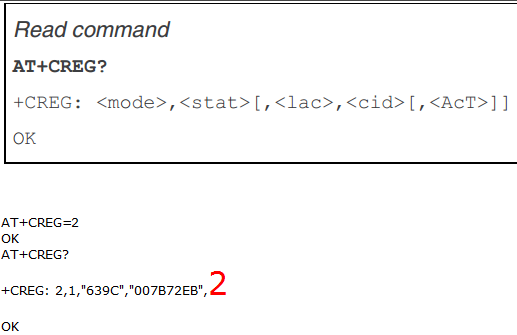
- Take note that AcT = 2
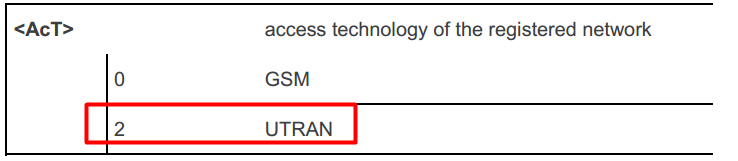
UTRAN (short for “Universal Terrestrial Radio Access Network”) is a collective term for the network and equipment that connects mobile handsets to the public telephone network or the Internet. It contains the base stations, which are called Node B’s and Radio Network Controllers (RNCs)[1] which make up the UMTS radio access network.[2] This communications network, commonly referred to as 3G (for 3rd Generation Wireless Mobile Communication Technology), —https://en.wikipedia.org/wiki/UMTS_Terrestrial_Radio_Access_Network
Since it is “2”, this mean MOBITEK S80 is connected to 3G network and SMS is sent via 3G network. - Will MOBITEK S80 be restricted to sending SMS via 2G only ?
- No, MOBITEK S80 can send SMS via 2G or 3G network.
https://www.quora.com/What-will-happen-to-SMS-when-2G-network-shutdown-and-there-is-only-3G-and-4G-network-available-Are-people-still-able-to-send-SMS-and-receive-SMS-from-their-3G-mobile-phone
More Information
- MOBITEK S80 is a 3G Modem for IoT and SMS
- MOBITEK S80 is 99% Compatible with Sierra Wireless FX100
- AT Command Guide for MOBITEK S80 GSM Modem
- MOBITEK S80 GSM Modem Works with CCG SMS Gateway
- MOBITEK S80 is the Solution to Singapore Shutting Down 2G Network
- New Version of Command Line SMS and MOBITEK S80
- How to Install USB Driver of MOBITEK S80 and Find the COM Port Number
Change Log of The Contents of MOBITEK MobiGATE Installer
This post has been moved to https://www.mobitek.my/main/news/change-log-of-the-contents-of-mobitek-mobigate-installer/
How to Code LibreOffice Basic (VBA) to Automatically Increase Number
Problem: I am using LibreOffice version 4.4, currently I use “drag down method” to automatically increase the number, e.g. LT1, LT2, LT3, …., LT100
How do I achieve the same result using LirbreOffice Basic (VBA)?
Solution:
REM ***** BASIC *****
Sub Main
rem define variables
dim document as object
dim dispatcher as object
rem get access to the document
document = ThisComponent.CurrentController.Frame
dispatcher = createUnoService("com.sun.star.frame.DispatchHelper")
dim args1(0) as new com.sun.star.beans.PropertyValue
dim args2(0) as new com.sun.star.beans.PropertyValue
dim i as integer
dim iLT as integer
rem goto cell "A1"
args1(0).Name = "ToPoint"
args1(0).Value = "$A$1"
dispatcher.executeDispatch(document, ".uno:GoToCell", "", 0, args1())
rem loop and insert suffix for "LT" of the item code
For iLT = 401 to 500
rem loop and insert suffix from "00" until "99" into the item code
For i = 0 to 99
args2(0).Name = "StringName"
if len(i) = 1 then
args2(0).Value = "06-st-0888-LT" & iLT & "-0" & i
else
args2(0).Value = "06-st-0888-LT" & iLT & "-" & i
end if
rem to enter the item code into the cell
dispatcher.executeDispatch(document, ".uno:EnterString", "", 0, args2())
rem move down one cell
dispatcher.executeDispatch(document, ".uno:GoDown", "", 0, args1())
Next i
Next iLT
End Sub
How to Resize Hard Disk Partition Without 3rd Party Software
Problem: my PC’s partition C drive is full, I need to increase the size or volume of the C drive. I have a lot of space in D drive. I do not have any 3rd party software like Paragon Partition Manager, EaseUS Partition Manager, etc. How do move or allocate free space in D drive to C drive?
Solution: you do not need any 3rd party software, Windows 7 and above should able to allocate free space from 1 partition to another (provided both partitions are on the same hard disk). Refer to the steps below …
- goto Disk Management
- if you wish to increase of the C drive volume, then right click on the partition next to C drive (in this case it is D drive)
- right click on D drive, select “Shrink Volume… ” to reduce the size of D drive:-
right click on C drive, select “Extend Volume…” to increase the size of C drive

How to Connect to MySQL Server (Host Machine) from VMWare (Virtual Machine)
Problem: I have an application in VMWare that needs to connect to MySQL database server in host machine. Both host machine and virtual machine are on the same server. How do I do it?
Solution: refer to the steps below …
- In host machine, one has to create a new MySQL User and assign privileges as below in Query prompt via phpMyAdmin or SQL editor:-
CREATE USER 'username'@'localhost' IDENTIFIED BY 'password'; GRANT ALL PRIVILEGES ON *.* TO 'username'@'localhost' WITH GRANT OPTION; CREATE USER 'username'@'%' IDENTIFIED BY 'password'; GRANT ALL PRIVILEGES ON *.* TO 'username'@'%' WITH GRANT OPTION; FLUSH PRIVILEGES;
- Once done with all four queries, the virtual machine should able to connect with IP address, user name and password of database’s host machine, e.g.:-
IP address: 192.168.0.59
Port: 3306
User: (username)
Password: (Password)
Source: http://stackoverflow.com/questions/1559955/host-xxx-xx-xxx-xxx-is-not-allowed-to-connect-to-this-mysql-server
List of Manuals/Guides Revised as at 2016-12-23
Here is a list of manuals or guides that were revised or recently published:-
- MOBITEK SMS API version 9 — Manual for Software Developer
- How to Use MOBITEK SMS API version 7 in Visual Basic .Net
- How to Send and Read SMS By Using Command Line
- How to Send and Read SMS Using PHP with MOBITEK SMS Engine Basic Edition
- How to Send and Read SMS in Java with MOBITEK SMS API v. 9
- How to Establish a GPRS Connection Using MOBITEK Q24 Modem
How to Find the COM Port Number of Sierra Wireless GL6110 GSM Modem
How to Configure WAMP Server to Support PHP and MySQL?
Applies To: PHP web application that requires connection to both SQL Lite and and MySQL database servers.
VB.net Sample Code for MOBITEK SMS API version 9.2 Revised
Visual Basic .Net sample code has been revised to include the following example:-
- GetMSISDN
- GetIMSI
- Voice class


