
SMS360 – Basic Edition version 4
Supported OS:-
- Windows XP
- Windows Vista
- Windows 7
- Windows 8
- 32 bit and 64 bit
For more information, please refer to:-
ISO File Name: SMS360 Basic Edition v. 4 for 1 modem_2014-12-29.iso
SMS360 – Basic Edition version 4
Supported OS:-
For more information, please refer to:-
ISO File Name: SMS360 Basic Edition v. 4 for 1 modem_2014-12-29.iso
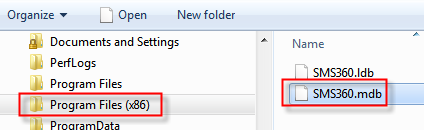
Goto Program Files (x86), right click on “SMS360.mdb”, and select “Properties”
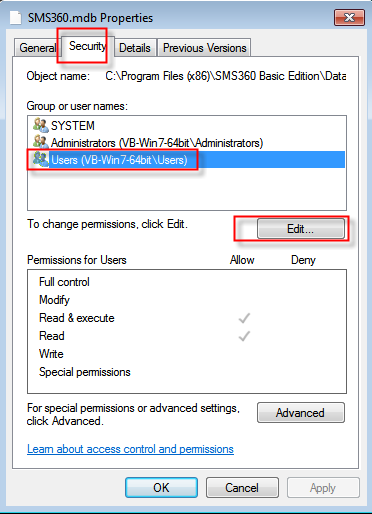
Select “Security > Users”, then click “Edit” button
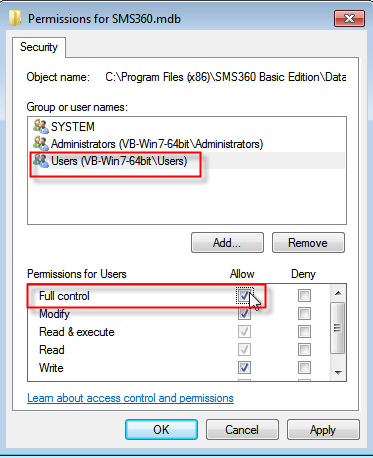
Check “Full control”, then click “OK”
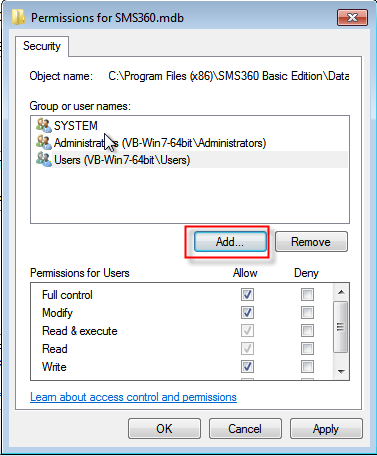
Click “Add” button
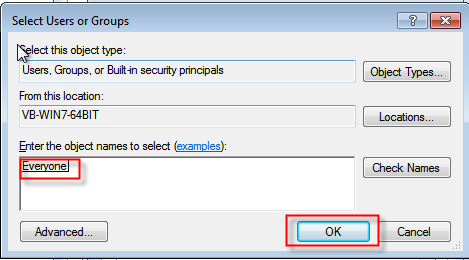
Type “Everyone” then click “OK”
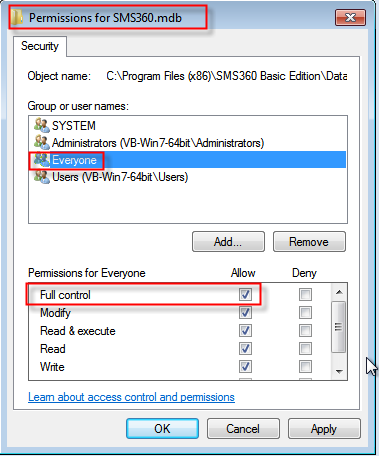
Check “Full control” for “Everyone, then click “OK”
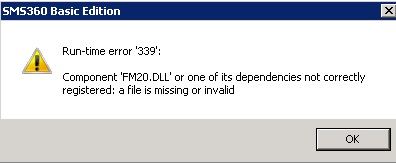
If you encountered error on missing “FM20.dll”, then install “ActiveX Control Pad” which is located in the USB thumb drive.
No, because MOBITEK SMS Gateway Development Kit only works with GSM modem Type SGDK. It will not with GSM modem that non-Type SGDK.
Even though 2 modems having the same brand and they look the same, in actual fact they have different firmware. And some firmwares have problem working with our SMS Gateway Development Kit. We test all modems sold by us to certify they can work with the SMS Gateway Development Kit.
MOBITEK Q24 MODEM operates on GSM network, quad band — 850/900/1800/1900 Mhz.
To find which network operator works with MOBITEK Q24 MODEM , please refer to this web site — http://www.gsmworld.com/roaming/gsminfo/index.shtml
|
EDITION |
ISSUED DATE |
REMARK |
|---|---|---|
|
1st |
1st of August, 2009 |
Draft release. |
|
2nd |
21st of December, 2009 |
Pictures added. |
|
3rd |
14th of Jan, 2010 |
Installation guide on USB adapter added. |
|
4th |
13th of March, 2011 |
|
|
5th |
8th of December, 2011 |
Pictures of “Serial Hub” added |
|
6th |
31st of December, 2013 |
Added “SOFTWARE: HOW TO SET-UP E-NET WITH MOBI GATE” |
|
7th |
12th of September, 2014 |
|
|
8th |
21st of November, 2014 |
“HARDWARE: CHASSIS” revised |
Here is a list of frequently asked questions on our Annual Support Programme or annual software maintenance.
The invoice number (the white label) is located at the back of the product/modem.
Alternatively, if you cannot find the invoice number, you can provide the serial number (usually 15 digit) of the product/modem, we will check for the invoice number on our record.
Problem: When calling the SMS.ReadSMS(), it returns “False” despite there are incoming SMS in the SIM card.
To replicate condition no. 1: send 1 SMS with “abcOK” only. Modem will received 1 incoming SMS, call SMS.ReadSMS(), it will return “False”.
To replicate condition no. 2: send 2 or more SMS with “OK” only. Modem will received 2 or more incoming SMS, call SMS.ReadSMS(), it will return “False”.
Cause: MOBITEK SMS API captures the response from modem partially, i.e. response that ends with 1st “OK” from modem. It did not capture full response with the last “OK” from modem. API will parse incorrectly and will return “False”.
The “OK” bug exists in these versions:-
Solution: bug is fixed in:-
If you are affected, please contact Customer Support Team.
No, because in order to do so, you need to access to the USSD server which is owned by TELCO. TELCO does not allow any 3rd party to modify the USSD menu.
(source: Sales FAQ no. 248)