No, because in order to do so, you need to access to the USSD server which is owned by TELCO. TELCO does not allow any 3rd party to modify the USSD menu.
(source: Sales FAQ no. 248)
No, because in order to do so, you need to access to the USSD server which is owned by TELCO. TELCO does not allow any 3rd party to modify the USSD menu.
(source: Sales FAQ no. 248)
| Product: |
|
| Which Development Kit are you using? |
|
| Which programming language are you using? |
|
| Expiry Date of Warranty and Support |
|
| What is the Operating System? |
|
| SIM Card Used: |
|
Suggested Solution to “I can’t find MobitekSMSAPI7.dll file in system32 folder”
Solution: If you are installing the MOBITEK SMS API version 7 in a 64 bit OS, then the “MobitekSMSAPI7.dll” is located in “C:\Windows\SysWOW64″ (source: http://www.samlogic.net/articles/32-64-bit-windows-folder-x86-syswow64.htm)
| Product: | MOBITEK® Q24 STK MODEM (1 SIM card) | Expiry Date of Warranty and Support | I14-2036-ONEMART 12 Month from 21,March 2014 |
||||||||||||||||||||||||
| Which STK API version are you using? |
|
What is the Operating System? |
|
||||||||||||||||||||||||
| Which programming language are you using? |
|
SIM Card Used: |
|
||||||||||||||||||||||||
| Description of Problem: | Case 1 : Network Operator is ORANGE. In this case the Main menu and Sub menu are not display correctly but in my cell phone it’s correct. See the attach screen capture
|
||||||||||||||||||||||||||
| Suggested Solution no. 1 | We suggest a work around:-
|
||||||||||||||||||||||||||
| Suggested Solution no. 2 | In countries where English is not the primary language, the STK Menu may display alphanumeric string instead of English text. We provide VB.Net sample code to decode the alphanumeric string.The VB.Net Sample Code decodes the alphanumeric string into UCS2 and then decode the UCS2 to display the unicode characters. The sample code is in the MOBITEK Air-Time Reload Development Kit CD.
Example, the alphanumeric string displayed by Orange STK Menu is “810E00C4E5F2EEE9E5F220F4F2E1EEF3AE “, the VB.Net sample code will decode it and convert to “Dernier trans.”. Refer image below. |
||||||||||||||||||||||||||
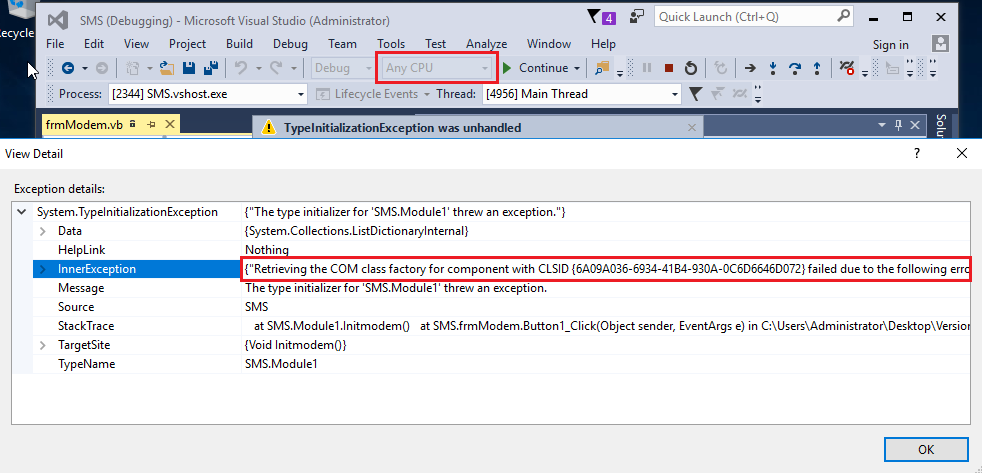
Problem: When calling the method Modem.Init(), this error appears – “Retrieving the
COM class factory for component with CLSID {C7B56BA9-90BC-4B2B-BA02-
DF1FCBE506A7} failed due to the following error: 80040154.
Solution:


SMSLib is a 3rd party software (MOBITKE does not develop it), please refer to SMSLib for support — http://smslib.org/doc/smslib/troubleshooting/
| Product: | MOBITEK® Q24 SMS Modem Model: S-657f Type: E IMEI: 356205030009943 |
Expiry Date of Warranty and Support | 12 Months After 26 June 2014 |
| The modem is connected with? |
|
What is the Operating System (ignore if not relevant)? |
|
| What software are you using to communicate with the modem? |
|
SIM Card Used: |
|
| Description of Problem: | Trouble getting it to work with Linux machines (“No such port”).But the very same java program works fine on Windows PC.813 2014-07-07 16:19:35,433 [Thread-4] INFO com.cardzone.oneswitch.sms.smslib.modem.SerialModemDriver – GTW: modem1: Closing: /dev/ttyS0 @115200 2040 2014-07-07 16:19:36,660 [main] INFO com.cardzone.oneswitch.sms.smslib.modem.ModemGateway – GTW: modem1: Stopping gateway… 2040 2014-07-07 16:19:36,660 [main] INFO com.cardzone.oneswitch.sms.smslib.modem.SerialModemDriver – GTW: modem1: Closing: /dev/ttyS0 @115200 2040 2014-07-07 16:19:36,660 [main] INFO com.cardzone.oneswitch.sms.smslib.modem.ModemGateway – GTW: modem1: Gateway stopped. 2241 2014-07-07 16:19:36,861 [main] ERROR com.cardzone.oneswitch.sms.smslib.smsserver.SMSServer – SMSServer error! com.cardzone.oneswitch.sms.smslib.GatewayException: Comm library exception: java.lang.RuntimeException: gnu.io.NoSuchPortException |
||
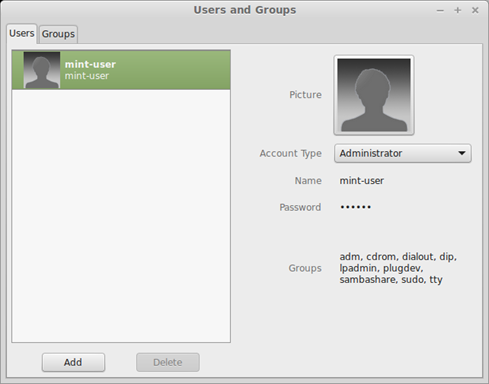
| Root Cause: | Permission/privilege to use serial port is NOT assigned to current user. | ||
| Solution: | grant permission — add “tty”, “dialout” into “Groups” of the current user |
||
Our commitment is to reply all e-mails requesting for support within 3 working days.
However, it is NOT the time taken to fix a problem.
We have responded to each of your e-mail. Please ensure your mail server does not block mails sent from our domain — mobitek.com.my
If the problem is caused by hardware failure, you have these options:-
If the problem is caused by software, you have these options:-
Please take note that our support is tied to a specific modem’s warranty period.
MOBITEK Q24 GSM Modem is compatible with SMSLib