Category Archives: Support

ERROR [IM002] [Microsoft][ODBC Driver Manager] Data source name not found and no default driver specified

Applies To:-

  • MOBITEK® MobiGATE
  • MOBITEK® SMS Engine — Enterprise Edition version 5 and 6
  • Windows 7, 8 and 2012; 64 bit

Error Message: ERROR [IM002] [Microsoft][ODBC Driver Manager] Data source name not found and no default driver specified

Solution: Do no use MySQL ODBC Driver 64 bit; must use 32 bit that is included in the CD, “mysql-connector-odbc-5.1.5-win32.msi”.


Virtual Serial Port Console Shows COM Port Not Connected

VSP Console version 2.8

VSP Console version 2.8 Shows “Unconnected”

Problem: after adding new “COM port” and adding new “net”, MobiGATE’s SMS Engine is not able to initialise the modem.

Solution: restart PC/server. Sometimes, the configuration in Virtual Serial Port Console will take effect after restarting.

Applies to:-

  1. MOBITEK® MobiGATE model: SG-4-E
  2. Virtual Serial Port Console version 2.8

More Information

MOBITEK SMS360 Can Convert E-Mail into Outgoing SMS and to Multiple Recipients

For system integrator who wish to convert e-mail to outgoing SMS, MOBITEK® SMS360 is a converter that simplifies the integration and conversion.

MOBITEK® SMS360 can convert e-mail triggered by SCADA, Network Monitoring System and any type of systems.

MOBITEK® SMS360 can broadcast SMS to multiple recipients by using single e-mail.

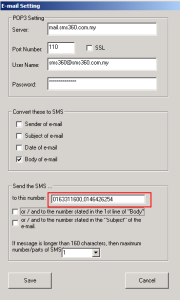
For converting 1 e-mail to multiple SMS recipients, you have can do it in 2 ways:-

  1. enter the list of numbers in 1st line of body, comma separated, inside bracket e.g. (013xxxxxxx, 016xxxxxxx)
    or
  2. enter the list of numbers in the setting, comma separated without bracket, refer to screen shot below:-
    • MOBITEK SMS360 E-Mail Edition

      MOBITEK SMS360 E-Mail Edition Converts E-Mail into Outgoing SMS

    • you must UNCHECK these:-
      • “or / and to the number stated in the 1st ….”
      • “or / and to the number sated in subject ….”

More Information

How to Back-up the Database of SMS360 Basic Edition

To back-up the database of SMS360 — Basic Edition, follow this step:

  • Copy database file — SMS360.mdb

1

  • The database file is located at — C:\Program Files\SMS360 Basic Edition\Database

2

  • Copy to your back-up location, e.g. thumbdrive

3

To restore the database of SMS360 — Basic Edition, follow this step:-

  • Copy from the your back-up location, e.g. your thumbdrive

4

  • Overwrite the original database file located at — C:\Program Files\SMS360 Basic Edition\Database

5