Category Archives: Support

Modems in MOBITEK Q24 STK Modem Hub is Not Able to be Connected

Product:
  • MOBITEK Q24 STK MODEM HUB, Model: STKMH-US401-C
  • MOBITEK Q24 STK API version 6.4
Which programming language are you using?
  • JAVA
  • JRE version: 8
  • JACOB versio: 1.14.3
OS Windows 7,  64 bit
Description of Problem: Three of the modems on one of the STK Hubs we ordered are not working. I have attached logs with the request.


Analysis
Based on the “STKEngine.log.txt”,the modem is able to initialise successfully using Modem.Init() is at COM port no. 18 (and not 17)

    • 2015-10-08 10:48:43 INFO  StkProcessor:117 - GSM modem port: 18 is connected to computer.
      2015-10-08 10:48:43 INFO  StkProcessor:128 - GSM modem port: 18 is connected to GSM network.
      2015-10-08 10:48:44 INFO  StkProcessor:131 - The operator of the GSM network is VodaCom Tanzania. Port: 18

Follow these steps and answer all questions:-

  1. What is the OS that Ports: 17,18,19,20 is having problem?
    Answer: Win 7  64 bit
  2. Does COM port no. 17, 19 and 20 has exclamation mark in “device manager”, refer image below and attached manual (same copy is in the CD)
    • Screenshot_1
    • Screenshot_2
    • Answer:  No
  3. If “yes”, kindly re-install the driver (by uninstalling and then re-install again)
  4. If “no”, then unplug STK MODEM HUB (Ports: 17,18,19,20) from server, and plug into another PC/server
    • IMPORTANT: make sure you select the correct driver version for the OS
    • install the USB driver, make sure there are no exclamation marks
    • make sure that only 1 hub is connected to the server/PC (we want to avoid conflicts/inteference)
    • the COM ports will be different, please check in device manager
  5. Run your Java code, does it work?
    Answer:  No
TROUBLE SHOOTING STEP no. 1: Please follow and answer all questions:-

  1. Connect the faulty hub (reported as  FAULTY HUB. Ports: 17,18,19,20) to another server.
  2. Ensure that MOBITK STK API version 6.4 is installed on another server.
  3. Ensure only 1 hub is connected to this server. There are no other hubs/modems.
  4. Install the correct USB driver. 4 Com ports will be generated.
  5. Ensure your Java programme is NOT running.
  6. Download a zip file:-
    • web browser will prompt for login, enter:
        • username = all
        • password = wemakesystemstalk
  7. Unzip “Testing Connection with MOBITEK Q24 STK Modem Hub.zip” onto your desktop
  8. Turn on power to modem “M1” only. Power to other modems are off. Run our SIM Tool Kit.exe (VB.Net executable), specifiy the COM port for “M1”. Click on the button “Connect to STK Modem”. Connected?
    • Answe: No
  9. Exit SIM Tool Kit.exe. Turn on power to modem “M2” only. Power to other modems are off. Run our SIM Tool Kit.exe (VB.Net executable), specifiy the COM port for “M2”. Click on the button “Connect to STK Modem”. Connected?
    • Answe: Yes
  10. Exit SIM Tool Kit.exe. urn on power to modem “M3” only. Power to other modems are off. Run our SIM Tool Kit.exe (VB.Net executable), specifiy the COM port for “M3”. Click on the button “Connect to STK Modem”. Connected?
    • Answe:    No
  11. Exit SIM Tool Kit.exe. Turn on power to modem “M4” only. Power to other modems are off. Run our SIM Tool Kit.exe (VB.Net executable), specifiy the COM port for “M4”. Click on the button “Connect to STK Modem”. Connected?
    • Answe:  No
  12. If “no”, then attach log file, “MOBITEK STK API Log ….txt".
  13. Attach screen capture of error message if any.
TROUBLE SHOOTING STEP no. 2:
  1. shut down power to STK MODEM Hub and disconnect the power cable to the Hub
  2. open the top panel
    • Screenshot_3
  3. check the cable connection between modem and PCB
    • ensure both ends are tightly connectedScreenshot_4
  4. Repeat the Trouble Shooting Steps no. 1 as mentioned above and give us the result:-
    • Turn on power to modem “M1” only. Power to other modems are off. Run our SIM Tool Kit.exe (VB.Net executable), specifiy the COM port for “M1”. Click on the button “Connect to STK Modem”. Connected?
      • Answer: Yes   /   No
    • Exit SIM Tool Kit.exe. Turn on power to modem “M2” only. Power to other modems are off. Run our SIM Tool Kit.exe (VB.Net executable), specifiy the COM port for “M2”. Click on the button “Connect to STK Modem”. Connected?
      • Answer: Yes   /   No
    • TExit SIM Tool Kit.exe. urn on power to modem “M3” only. Power to other modems are off. Run our SIM Tool Kit.exe (VB.Net executable), specifiy the COM port for “M3”. Click on the button “Connect to STK Modem”. Connected?
      • Answer: Yes   /   No
    • Exit SIM Tool Kit.exe. Turn on power to modem “M4” only. Power to other modems are off. Run our SIM Tool Kit.exe (VB.Net executable), specifiy the COM port for “M4”. Click on the button “Connect to STK Modem”. Connected?
      • Answer: Yes   /   No

If the result remains “No”, then we will proceed to claim warranty.

Final Solution: We manage to check the device after opening the case, and realized the cables where disconnected. Now we have all modems working and connected.


M-Pesa SIM Card — Input Value in UCS2 Format

M-Pesa

M-Pesa

There are new batch of M-Pesa SIM Card with STK (SIM Tool Kit) that requires you to input value in UCS2 format instead of text format.

In order to submit or input value in UCS2 using MOBITEK®  Q24 STK API , you need convert the text into USC2 (hexadecimal) format, e.g.

Michael => 004d00690063006800610065006c


More Information


Java Sample Code for MOBITEK STK API version 6.3 — Send and Read SMS

Introduction

STK refers to SIM Tookit or SIM Tool Kit.

SAT refers to SIM Application Toolkit

Both terms are interchangeable.

Java Sample Code

Declaring variables

 static Variant vMOBITEK;
 static boolean bMOBITEK;
 static int iMOBITEK;
 static String sMOBITEK;

//construct objects for each class in "MobitekSTK6.dll"

static ActiveXComponent Modem = new ActiveXComponent ("MobitekSTK6.Modem");
static ActiveXComponent STKAPI = new ActiveXComponent ("MobitekSTK6.SIMToolKit");
static ActiveXComponent SMS = new ActiveXComponent ("MobitekSTK6.SMS");

To send SMS in java

public static void sendMessage()
 //SV: to send SMS; maximum 160 characters 
 {

 //########### turn delivery status report on #######################
 //call API to turn delivery status report on
 vMOBITEK = SMS.invoke("DeliveryReportOn");
 //the return value of "DeliveryReportOn" is a boolean
 bMOBITEK = vMOBITEK.getBoolean();
 //AQ : therefore assign bMOBITEK as return value of "DeliveryReportOn" 
 if (bMOBITEK)
 {
 System.out.println("Delivery status report is turned on.");
 }
 else
 {
 System.out.println("Delivery status report is NOT turned on!");
 }
 //########### end: turn delivery status report on #######################
 
 //------------------ send SMS ----------------------------------------
 //set value of property;
 //"ToNumber" is the recipient's number;
 SMS.setProperty("ToNumber", "0176096718");
 //"ToMessage" is the SMS to be send to the recipient; maximum 160 characters
 SMS.setProperty("ToMessage", "Hello from JAVA with SMS API version 7. Test no. 6");
 //AQ : call API to send new message
 vMOBITEK = SMS.invoke("SendSMS");
 //AQ : the return value of "SendSMS" is a boolean
 bMOBITEK = vMOBITEK.getBoolean();
 //AQ : therefore assign bMOBITEK as return value of "SendSMS" 
 if (bMOBITEK)
 {
 System.out.println("Message sent!");
 
 //try 3 times
 for (int i=1; i<=3; i++) 
 {
 try {
 //AQ : call API to get delivery report
 vMOBITEK = SMS.invoke("GetDeliveryReport");
 //AQ : the return value of "GetDeliveryReport" is a boolean
 //AQ : therefore assign bMOBITEK as return value of "GetDeliveryReport"
 bMOBITEK = vMOBITEK.getBoolean();
 if (bMOBITEK)
 {
 //when "GetDelIveryStatusReport = True", then get value of properties
 int DRStatus = SMS.getPropertyAsInt("DRStatus"); 
 String DRMNRecipient = SMS.getPropertyAsString("DRMNRecipient");
 String DRMsgRef = SMS.getPropertyAsString("DRMsgRef");
 String DRFDate = SMS.getPropertyAsString("DRFDate");
 String DRFTime = SMS.getPropertyAsString("DRFTime");
 String DRRDate = SMS.getPropertyAsString("DRRDate");
 String DRRTime = SMS.getPropertyAsString("DRRTime");
 
 if (DRStatus == 1)
 {
 //System.out.println("The status of your outgoing SMS with reference number, " + DRMsgRef + ", is " + DRStatus + ".");
 System.out.println("The status of your outgoing SMS with reference number, " + DRMsgRef + ", is delivered.");
 System.out.println("Your outgoing SMS was received by the SMS Centre on " + DRRDate + ", at " + DRRTime + ", and was successfully delivered to " + DRMNRecipient + ", on " + DRFDate + ", at " + DRFTime + ".");
 }
 else
 if (DRStatus == 0)
 {
 //System.out.println("The status of your outgoing SMS with reference number, " + DRMsgRef + ", is " + DRStatus + ".");
 System.out.println("The status of your outgoing SMS with reference number, " + DRMsgRef + ", is not delivered.");
 System.out.println("Your outgoing SMS was received by the SMS Centre on " + DRRDate + ", at " + DRRTime + ", and was NOT successfully delivered to " + DRMNRecipient + "."); 
 }
 else
 if (DRStatus == 2)
 {
 //System.out.println("The status of your outgoing SMS with reference number, " + DRMsgRef + ", is " + DRStatus + ".");
 System.out.println("The status of your outgoing SMS with reference number, " + DRMsgRef + ", is unknown.");
 System.out.println("Your outgoing SMS was received by the SMS Centre on " + DRRDate + ", at " + DRRTime + ", and NO status is available.");
 }
 
 break; 
 
 }
 
 else
 {
 System.out.println("No delivery status report available!"); 
 }
 
 //SV: wait for 5 seconds before looping; delivery report from GSM network takes time
 Thread.sleep(5000);
 }
 catch (InterruptedException e)
 {
 // TODO Auto-generated catch block
 e.printStackTrace();
 }
 } 
 }
 else
 {
 System.out.println("Message NOT sent!");
 }
 //------------------ end: send SMS ----------------------------------------
 }

To Read SMS in java

public static void readMessage() {
 //AQ : readMessage() function is for modem to read incoming message from the sender 
 //------------------------------------------- read SMS -------------------------------------------
 //call API to read incoming SMS 
 vMOBITEK = SMS.invoke("ReadSMS");
 //AQ : the return value of "ReadSMS" is a boolean, therefore assign bMOBITEK as return value of "ReadSMS"
 bMOBITEK = vMOBITEK.getBoolean();
 //if there is new SMS, then get property
 if (bMOBITEK)
 {
 //property "MN" is the sender's mobile number 
 String InNumber = SMS.getPropertyAsString("MN");
 //property "MSG" is the sender's message
 String InMessage = SMS.getPropertyAsString("MSG");
 //property "SCTS" time of the message received by SMS Centre
 String InTime = SMS.getPropertyAsString("SCTS");
 System.out.println("Incoming SMS Read \n From: " + InNumber + "\n Message: "+ InMessage + "\n Time: " + InTime );
 }
 else
 {
 System.out.println("No incoming SMS!");
 }
 //---------------------------------------- end: read SMS ----------------------------------------- 
 }

More Information

Path/File Access Error

Problem

When running sample code of Java for MOBITEK®  Q24 STK API, you may encounter an error message:-

Exception in thread “main” com.jacob.com.ComFailException: Invoke of: Init Source: MobitekSTK6 Description: Path/File access error

Applies To

  • MOBITEK®  Q24 STK API version 6.x
  • Windows 7 and above; 32 bit and 64 bit
  • JACOB version 1.14.3
  • JRE 1.6 and above

Solution

Run Eclipse as an administrator.

How to Solve “System.UnauthorizedAccessException was unhandled”

Problem

When running sample code of VB.net, you may encounter an error message “System.UnauthorizedAccessException was unhandled”

Applies To

  • Windows 7 and above; 32 bit and 64 bit
  • MOBITEK SMS API version 7 and above
  • MOBITEK STK API version 6 and above

Solution

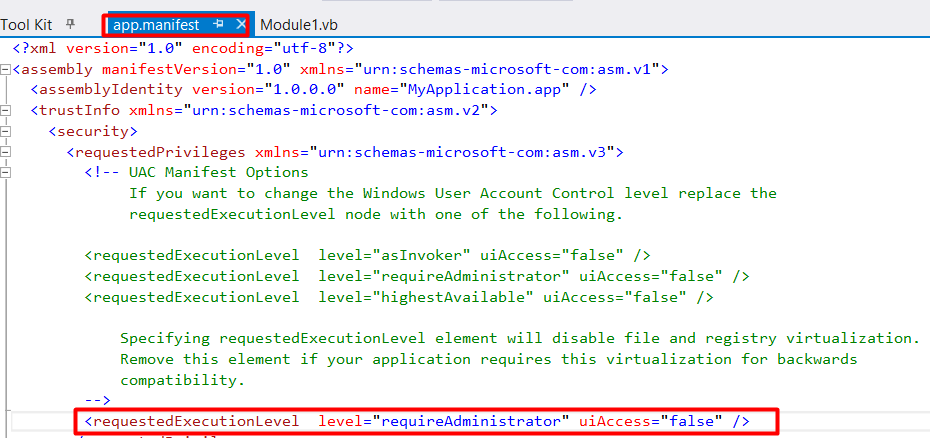
Replace

<requestedExecutionLevel level="asInvoker" uiAccess="false"/>

with

<requestedExecutionLevel  level="requireAdministrator" uiAccess="false" />

Follow these steps:-

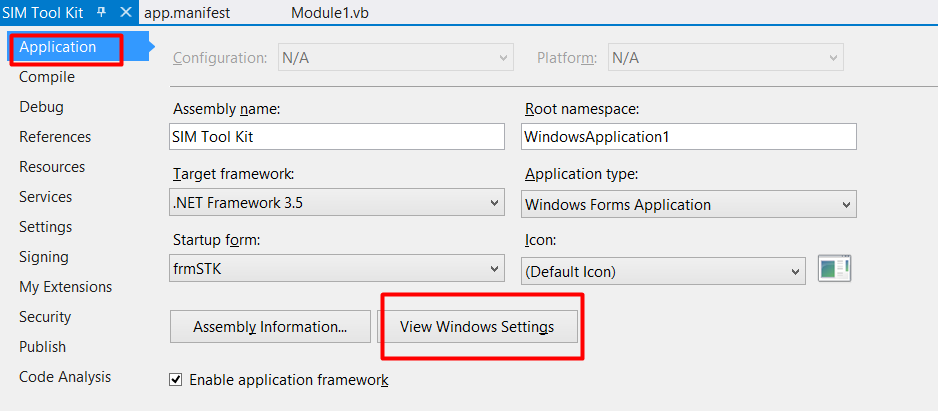
For Visual Studio 2015, goto "View Windows Settings"

For Visual Studio 2015, goto “View Windows Settings”

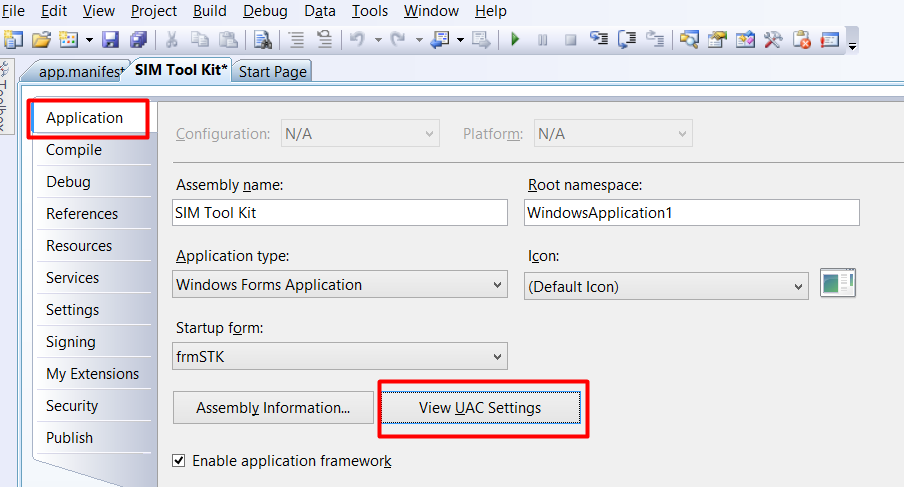
For Visual Studio 2008, goto "View UAC Settings"

For Visual Studio 2008, goto “View UAC Settings”

Replace <requestedExecutionLevel>

Replace level= “asInvoker” uiAccess= “false” with level= “requireAdministrator” uiAccess= “false”


Java Sample Code for MOBITEK STK API version 6.2 — InputRequest() and InputSubmit()

Introduction

STK refers to SIM Tookit.

SAT refers to SIM Application Toolkit

Both terms are interchangeable.

Java Sample Code

//To display a request from STK menu for an input
vMOBITEK = STKAPI.invoke("InputRequest");
sMOBITEK = vMOBITEK.getString();
System.out.println ("STK Menu has requested for an input: " + sMOBITEK + ".");
//To submit an input to STK Menu
strInput = "OK"
vMOBITEK = STKAPI.invoke("InputSubmit",strInput);
bMOBITEK = vMOBITEK.getBoolean();

More Information

Bug in MOBITEK STK API version 6.2.1

Bug Found In

  • MobitekSTK6.dll version 6.0, 6.1 and 6.2.1
  • MobitekSTK6.dll — ReadSMSText() always return “False” after calling SendSMS().

Test Procedure

  1. Send 10 messages from cellphone to the MOBITEK Q24 STK Modem.
  2. Call the function ReadSMSText() four times, it display the 4 messages.
  3. Then send 1 message from MOBITEK Q24 STK Modem to cellphone.
  4. Cellphone will receive the message.
  5. Call the function ReadSMSText(), return value is always “False” even though there are remaining 6 messages in SIM card.

Suggested Solution

  1. Use ReadSMS() instead; or
  2. Bug has been fixed in MOBITEK STK API verion 6.3

Status

  1. Bug has been fixed in MOBITEK STK API verion 6.3