
VCOM is a Windows Application. It is NOT a Windows Service. VCOM will auto-run when user has logged into (entering user name and password) Windows. Otherwise, VCOM will not run.
To run VCOM as a Windows Service you can manually create a Windows Service using these steps. However, take note that you cannot run VCOM as both Windows Application and Windows Service mode at the same time.
CONFIGURE VCOM AS WINDOWS SERVICE
- First, IP address of MobiGATE and all 8 modems must be properly configured in VCOM application.
- Disable “auto-start” in VCOM application:

- Exit completely VCOM application.
- Download and install Windows Server 2003 Resource Kit Tools from Microsoft web page or from here …
- Only 2 executable files are needed:
- INSTSRV.exe
- SRVANY.exe
- After you have installed, run this command in command prompt:
C:\Program Files\Windows Resource Kits\Tools>INSTSRV.exe VCOM "C:\Program Files\Windows Resource Kits\Tools\SRVANY.exe"
- Run Registry Editor (Regedt32.exe), check the registry to verify that the ImagePath value under “HKEY_LOCAL_MACHINE\SYSTEM\CurrentControlSet\Services\VCOM” is set to
"C:\Program Files\Windows Resource Kits\Tools\srvany.exe"
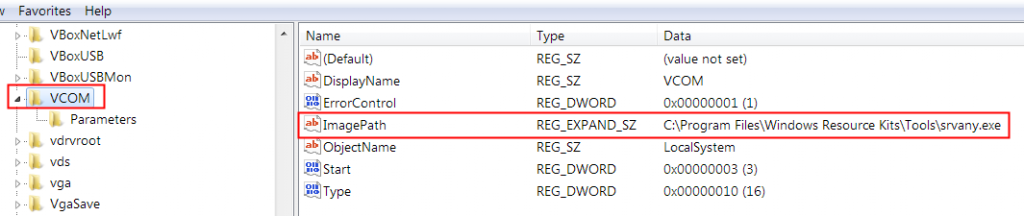
- Right click on VCOM, from the Edit menu, click “Add Key”. Type the following and click “OK”:
Key Name: Parameters
Class : <leave blank>
- Select the “Parameters” key, click “Add Value”. Type the following and click “OK”:
Value Name: Application
Data Type : REG_SZ
String : C:\Program Files\VCOM\VCOM\vcom.exe

- Exit Registry Editor and goto “Computer Management > Services” configure “VCOM” to run “Automatic”

- After service is started, 8 COM ports are created:

WARNING
- After VCOM service is started, then you start VCOM application, the application could NOT show all the 8 modems and 8 COM ports:
 VCOM application must be closed.
- If you want VCOM application to show all modems, then you must first stop the VCOM service, the only start VCOM application.
- VCOM cannot be running as both Windows Application and Windows Service mode at the same time.
Source: https://support.microsoft.com/en-my/help/137890/how-to-create-a-user-defined-service


