- Stop the SMS Engine Service

- Right-click on the modem -> “Properties”

- Edit the values (red box) where necessary, then click “OK”

Category Archives: Support
How to Prevent Brute Force Attack by Hackers to Gain Access to Your WordPress Site
Problem
To log into a WordPress Site, user name and password are required.
Hacker can obtain user name from the name of author in blog post, then goto WordPress default log-in page — https://your_domain_name.com//wp-admin/ , hacker will guess password to log into your WordPress site, hence “brute force”.
In a minute, if a hacker can guess 10 passwords then in a day, hacker can try 14,400 different passwords (10 x 60 x 24 ) to try to log into your WordPress site.
It is a matter of time, the hacker can guess the correct password.
Solution: use “Loginizer Security” plug-in to prevent brute force attack
- Install plug-in “Loginizer Security“.

- Under “Blacklist”, enter range of IP address that is not in your home country. This will reduce brute force attack significantly.

Virus Infected E-mail from Sooted@bodlos.at
If you received such e-mail with attachment, delete it immediately as the attachment is a virus/malware/trojan.
Virus Infected E-mail from contact@bioaqriland.com
If you received such e-mail with attachment, delete it immediately as the attachment is a virus/malware/trojan.
 HI,

Please send us quotation for attached.

 Best Regards. WANG KAI yuen=
   Yuenac@cosco.com
  COSCO Marine Engineering (S) Pte Ltd
 52 Penjuru Lane Singapore 609213
  =

 Tel: +65 6261 8009
 Email: commercial@coscomarine.com.sg
  =

 ....
  =

 Address 16 Raffles Quay=FF0C#36-01 Hong Leong Building=FF0CSingapore 048581
  =

 Phone 65-6226 1900
 =


 Don't print except absolutely necessary
Virus Infected E-mail from Adeoti.Famurewa@dhl.com
If you received such e-mail with attachment, delete it immediately as the attachment is a virus/malware/trojan.
Refer to DHL web site for more information — https://www.logistics.dhl/global-en/home/footer/fraud-awareness.html
Dear Sir,

This is to inform you of the arrival of your shipment on the above
Airway bill number and in the attached document through our Worldwide
Parcel Express Service.

THIS SHIPMENT HAS BEEN CONSIDERED DUTIABLE BY THE CUSTOMS SERVICE AND
WOULD BE RELEASED SUBJECT TO THE PAYMENT OF THE TOTAL DUE ON DUTIES AND
TAXES AS ANALYZED IN THE ATTACHED DOCUMENTS AND BELOW INVOICE SUMMARY.

KINDLY EFFECT PAYMENT OF THE TOTAL DUE BELOW WITHIN 7 WORKING DAYS
EFFECTIVE FROM THE DATE THIS LETTER IS RECEIVED AND FORWARD THE PAYMENT
DETAILS . This is to avoid shipment incurring demurrage charge and the
subsequent transfer to Government warehouse after 28 days as required by
regulations.

INVOICE SUMMARY ATTACHED:

ADMINISTRATIVE FEES

Administrative Fees are charged on every clearance as DHL handling
charge. This is 4% of Total Duty (ON THE MINIMUM OF $10.00) and Taxes
and 5% VAT, which should be paid along with duty into our GTB account
provided below.

DEMURRAGE CHARGE

DEMURRAGE CHARGE SHALL COMMENCE 8 WORKING DAYS FROM THE DATE YOUR
SHIPMENT IS SCANNED INTO THE CUSTOMS BOND AND ENDS ON THE DAY DUTY IS
PAID. THIS CHARGE SHOULD BE PAID ALONG WITH TOTAL DUTY TO AVOID DELAY IN
RELEASE OF YOUR PACKAGE. MINIMUM CHARGE $5.00.

PAYMENT DETAILS

PAYMENT MODE

ACCOUNT NUMBER

BRANCH SORTCODE

ACCOUNT NAME

ACCOUNT TYPE

BANK

Online Payment

0138852358

0-58152227

DHL International LTD

Current

stanbic Bank

Cash Payment

0011528581

N/A

DHL International LTD

Current

stanbic Bank

CASH PAYMENTS SHOULD BE MADE THROUGH STANBIC BANK BRANCHES NATIONWIDE.

TO AVOID DELAY IN RELEASE OF YOUR SHIPMENT, ENSURE CORRECT WAYBILL
NUMBER (TRACKING NUMBER) IS CLEARLY INDICATED ON THE BANK COPY OR IN THE
REMARKS DESCRIPTION FIELD FOR ONLINE PAYMENTS AND FORWARD PAYMENT
DETAILS

QUERIES /COMPLAINTS ON CUSTOMS CHARGES

For queries and Complaints on charges should be directed to our customs
Desk through los_duty@dhl.com; losgcsdteam@dhl.com

INFORMATION ON TRADE & CUSTOMS DUTY AND TAXES

For more information on Trade & Customs Duty and Taxes please visit
Customs website www.customs.gov [1]

Yours Faithfully,

Davids Malachi

CUSTOMS CLEARANCE MANAGER

Regards,

ADEOTI FAMUREWA

GATEWAY CUSTOMER SERVICE DESK ADVISOR

DHL EXPRESS

LOS Gateway
International Airport. Nahco Shed,

E-MAIL: adeoti.famuewa@dhl.com

CONFIDENTIALITY NOTICE: This message is from DHL and may contain
confidential business information. It is intended solely for the use of
the individual to whom it is addressed. If you are not the intended
recipient please contact the sender and delete this message and any
attachment from your system. Unauthorized publication, use,
dissemination, forwarding, printing or copying of this E-Mail and its
attachments is strictly prohibited. CONFIDENTIALITY NOTICE: This message
is from DHL and may contain confidential business information. It is
intended solely for the use of the individual to whom it is addressed.
If you are not the intended recipient please contact the sender and
delete this message and any attachment from your system. Unauthorized
publication, use, dissemination, forwarding, printing or copying of this
E-Mail and its attachments is strictly prohibited.
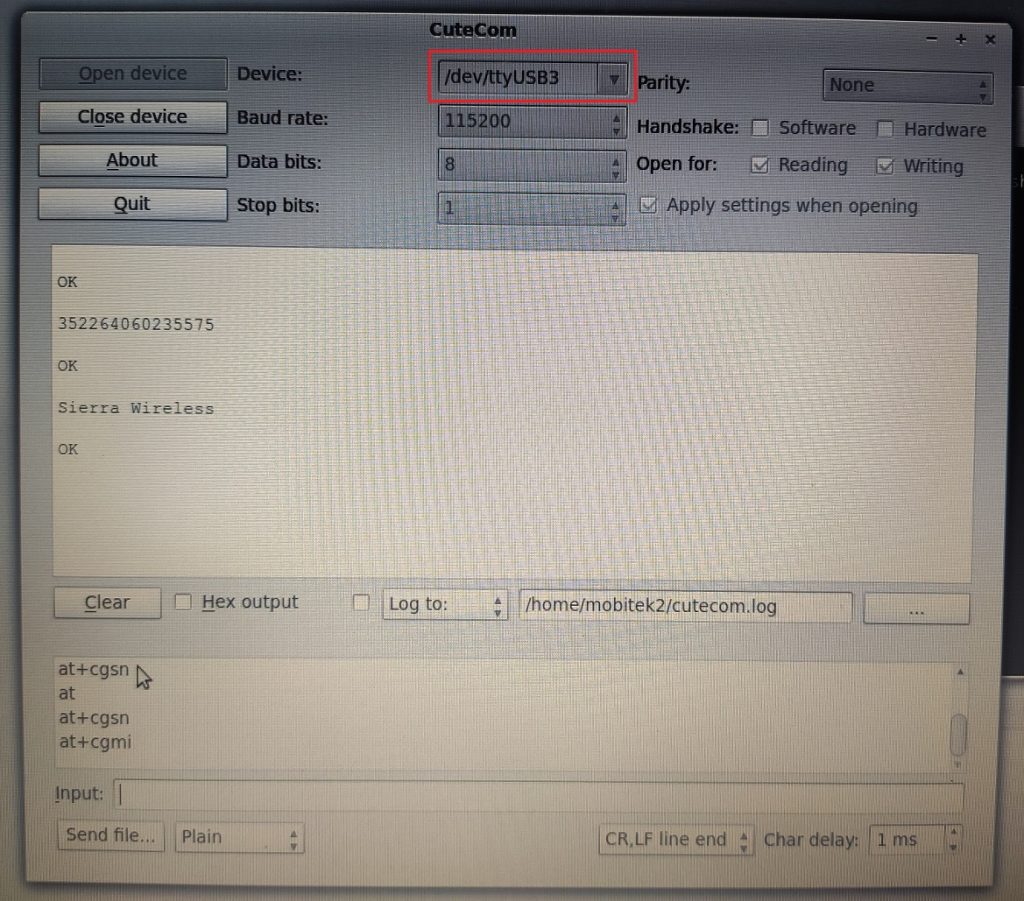
Which ttyUSB is the COM Port of MOBITEK S80 3G Modem in Linux
Applies to MOBITEK S80 3G Modem
- Connect MOBITEK S80 3G Modem to Linux PC/machine via USB port.
- No USB is required as most Linux distributions have pre-installed.
- Linux will show 4 USB devices added:-
- ttyUSB0
- ttyUSB1
- ttyUSB2
- ttyUSB3

- Choose “ttyUSB3” as the COM port of MOBITEK S80 3G Modem.


How to Make Civilization IV Run in Windows 8.1 64-bit
Civilization IV will give you these error messages in Windows 8.1 64-bit:-
- “The program can’t start because D3DX9_32.DLL is missing from your computer. Try reinstalling the progrom to fix the problem”; and
- “Error loading shader libraries”
If these solutions do not work:-
- re-installing Civilization IV in “compatibility mode” as mentioned in Microsoft Community; or
- running “dxwebsetup.exe” to re-install DirectX version 9 as mentioned in Microsoft Community;
Then these will 100% solve the problems:-
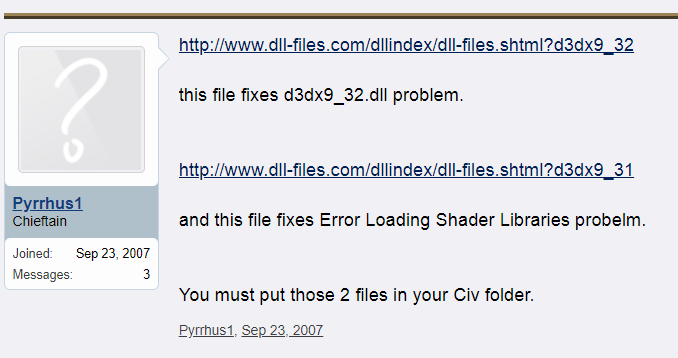
- download “d3dx9_32.dll”, unzip and copy to folder “C:\Windows\SysWOW64”; and
- download “d3dx9_31.dll”, unzip and copy to folder “C:\Windows\SysWOW64”; this dll will solve “Error loading shader libraries”
This is because Windows 8.1 64-bit does not have “d3dx9_32.dll” and “d3dx9_31.dll” by default.
Source: https://forums.civfanatics.com/threads/to-those-with-d3dx9_32-dll-problems.232577/page-3
Reasons:-
- Windows 8.1 64-bit by default is installed with DirectX 11 and it does not have all the dll files (d3dx9_xx.dll) of DirectX 9;
- DirectX 9 is required to run old games such as Civilization IV that support Windows Vista and below.
How to Solve the Problem of “mcpu.exe – Application Error : The application was unable to start correctly (0xc0000142)”
Applies To:
- MOBITEK MobiGATE Model SG-B-4-L / SG-B-8-L series (model having LAN port)
- VCOM version older than 4.5.11
Problem: Windows applications not able to run or the whole PC/server will hang.
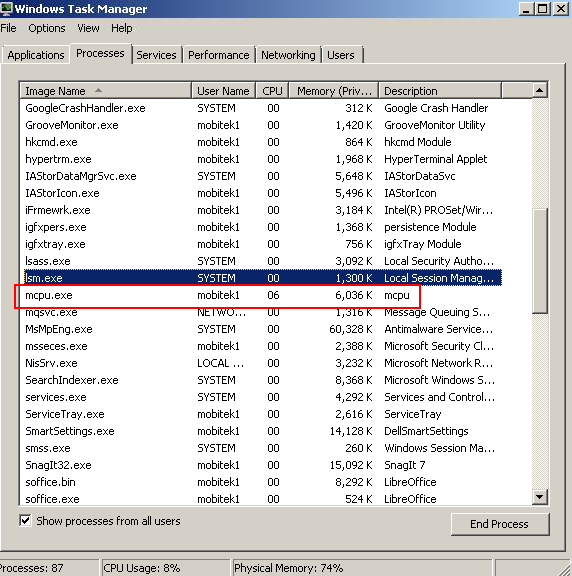
- In “Windows Task Managmer”, “mcpu.exe” will appear everytime VCOM connects to modem in MobiGATE then will disappear:-
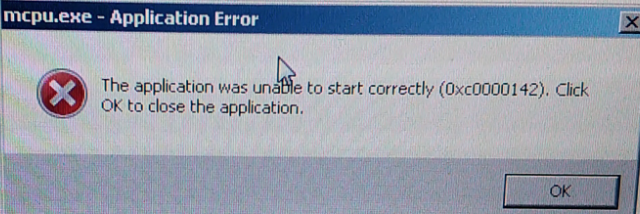
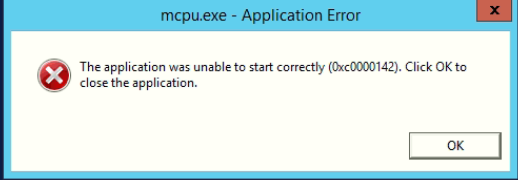
- After running VCOM for few days, Windows will show an error message “mcpu.exe – Application Error : The application was unable to start correctly (0xc0000142)”:-
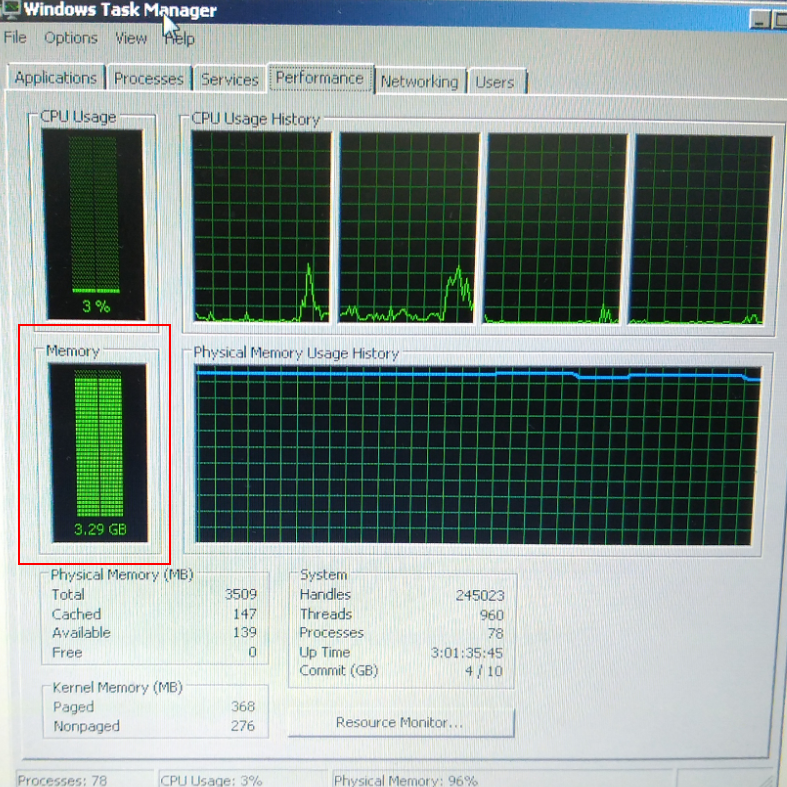
- “Windows Task Manager” shows high memory usage:-
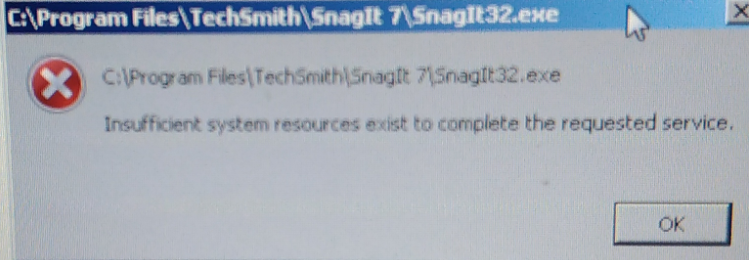
- This will caused other Windows applications not able to run or the whole PC/server will hang:-
Solution: VCOM version older than 4.5.11 has memory leak, causing high memory usage. Therefore, need to install version 4.5.11.
How to Recover From Ransomware Attack
HISTORY OF ATTACK
- 1st Attack: 2019-Nov-20
- 2nd Attack: 2020-Jan-9, encrypted file with “Harma” suffix
- 3rd Attack: 2024-Feb-14, encrypted file with “.mkp” extension
RECOVERY
- Shut down all PCs on the network.
- Disconnect all LAN/ethernet cable and disable Wi-Fi connection from all PCs to prevent any LAN or internet connection.
- A PC is infected by ransomware if the files in the PC are encrypted and cannot be opened.
- One by one, connect each PC to internet, update virus definition of Windows Defender (or anti-virus software) and run full scan.
- Take note of the date and time the files are encrypted on all PCs.
- The PC having encrypted files with the earliest date & time is the 1st PC being infected.
- On another clean PC that is not connected to the LAN, run full scan on the back-up files and Windows system image that were created by Windows Backup.
- If you do not have any back-up of files and a recent copy Windows image file before the attack then recovering from ransomware attack is impossible.
- Once the back-up files are scanned and certified clean, then create another back-up copy of all back-up files and Windows system image onto a separate external hard disk.
- In case the back-up files and Windows system image are infected when doing restore, you still have a back-up copy.
- After all PCs are scanned and cleaned by Windows Defender (or any anti-virus software), one by one:-
- restore each PC using Windows system image that is dated earlier then the date of ransomware attack.;
- note: Windows system restore WILL NOT work;
- if Windows system image is not available, then
- reset your PC (https://support.microsoft.com/en-my/help/17085/windows-8-restore-refresh-reset-pc) ; or
- format hard disk and re-install Windows
- run Windows update to update all Windows securities (KB);
- using Windows Defender (or any anti-virus software) to run a full scan to ensure that there is no trace of ransomware after Windows has been restored;
- then finally restore all files that are encrypted by ransomware from SyncBack, Windows Backup and Restore or File History.
- restore each PC using Windows system image that is dated earlier then the date of ransomware attack.;
- DO NOT connect all PCs to the LAN at the same time. But connect it one by one Then monitor if there are any files that are encrypted. If there are none, then connect another PC to the LAN. Repeat until all PCs are connected to LAN and internet.
PREVENTION
- Usually, ransomware is an attachment in e-mail and if e-mail has been identified has the entry of attack, then change the e-mail address.
- Enable e-mail redirection for non-spam mail to the new e-mail address.
- Delete the old e-mail address that is constantly being attacked by spammer when all customers, suppliers, etc. has been notified on the new e-mail address.
- Configure e-mail client, e.g. Thunderbird:-
- NOT to download or retrieve all contents of e-mail;
- set to download e-mail without any attachment or only the header of e-mail only;
- if the e-mail is from a known sender, then only download the full message with attachment.
SECURITY
- Create 2 user accounts in Windows of UBS-SERVER:-
- adminstrator account
- only adminstrator can perform back-up and access to back-up files in external hard disk
- standard user account — log-into this account to run 24 hours
- adminstrator account
- Run UBS-SERVER in 24 hours using standard user account (do NOT use administrator account).
- If possible, avoid running UBS-SERVER in 24 hours x 7 days, set UBS-SERVER to sleep or shut down at 10 pm every night and wake up at 8 am every morning:-
- use Task Scheduler to put PC to sleep at night;
- use BIOS setting to boot up PC in morning or use Task Scheduler to wake-up PC.
- if using Task Scheduler, ensure that “Allow wake timers” is enabled

- if using Task Scheduler, ensure that “Allow wake timers” is enabled
- Change the RDP port number after recover from a ransomware attack.
- Set anti-virus software to perform a full scan everyday instead of quick scan on PC.
- Remove all user accounts of Windows and replace them with new user accounts as hacker may have obtain the Windows user account.
- Review Windows Firewall — remove any unused applications or ports.
- For external hard disk drive that is used for back-up, only allow 1 user that is “administrator” to access the hard disk. Do not make folders and files available to “everyone”.
- For SERVERLINK:-
- configure Brute Force

- set time period to allow external RDP connection in Working Hours

- enable Ransomware feature

- set Homeland to only allow IP address from home country

- configure Brute Force
BACK-UP PROCEDURE
- Create a back up policy that back up files and Windows image in these locations:-
- external hard disk that is connected on LAN;
- cloud or web hosting that is connected via internet;
- removable external hard disk that is NOT connected on LAN or internet.
- Back up all files using Windows Backup on daily basis to external hard disk that is connected on LAN.
- Save Windows Image using Windows Backup on weekly basis or daily basis to external hard disk that is connected on LAN.
- Back up all files in external hard disk to cloud (Drop Box, One Drive, etc.) or to web hosting server that is connected via internet.
- Back up all files in external hard disk that is connected on LAN to removable external hard disk that is disconnected from LAN and internet.
- Here is a list of useful back up softwares:-
- SyncBack
- File History by Windows
- Windows Backup & Restore
How to Solve “Search port 1901 is occupied”
If you received the warning message “Search port 1901 is occupied” when using “Smart VCOM”

then please close the application “USR-TCP232-Setup” as it is using the same search port 1901.
