- Open LibreOffice that containing the macro
- Click “Tools” -> “Customize…”

- In Customize, Click “Keyboard” tab and scroll down the “Category” section until you find “LibreOffice Macros“. Select the macro.
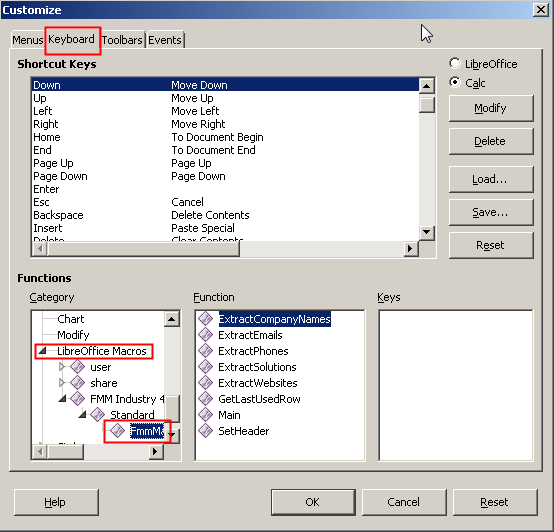
- Select the function that you want to assign the shortcut key in “Function” section and find the available keys in “Shortcut Keys” area. Select the key and click “Modify” button. Click “OK”

Category Archives: Support
There is No AT Command to Remove “CNS Port”, “DM Port” and “NMEA Port” of MOBITEK S80 Modem / support case #281
CONCLUSION:
- There is no AT command to remove “CNS Port”, “DM Port” and “NMEA Port”;

- These 3 COM ports can be disabled in “Device Manager” but cannot be removed;
- If “CNS Port” is disabled, modem will not able to send out SMS
Renaming “Sierra Wireless” in COM Ports
Objective: to use AT command to rename “Sierra Wireless” to “MOBITEK” so that all the 4 COM ports will display “MOBITEK”
Result: after using the “AT+WUSB” to change name to “MOBITEK”, the 4 COM ports in device manager still show as “Sierra Wireless” .

In addition, there is no AT command to remove the other 3 COM ports, “CNS”, ‘DM” & “NMEA”
How To Solve Modem Cannot be Connected or Unresponsive in CuteCom Linux
Applies To: MOBITEK S80 Modem, MOBITEK Q24 Modem, Linux OS
Caused By: permission or privilege to use serial port or USB port is NOT assigned to current user.
Solution: grant permission to current user by adding “tty”, “dialout” into “Groups” of the current user.
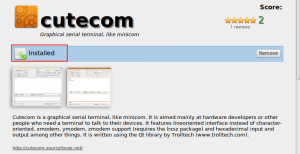
- Optional — install “Cutecom” from Software Manager.
 Click on “install”
- Go to “User and Groups”.

- Click on the current user and then click on “Groups”.

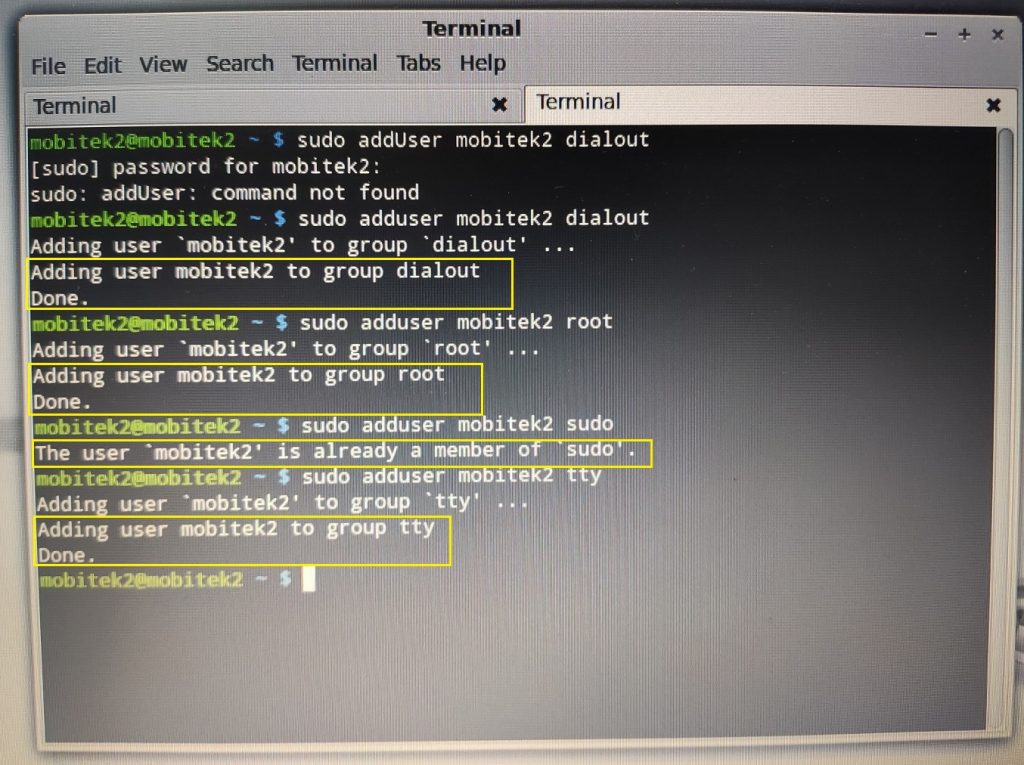
- Assign the following “Groups” or permissions to the user:-
- dialout
- root
- sudo
- tty
- Alternatively, command line can be used to add permission to the user:-
- Restart Linux.


Theme of MOBITEK Blog Has Been Changed from “Twenty Eleven” to “Twenty Tweleve” and How to Add a Search Box
Original “Twenty Tweleve” theme does not have a search box at top right corner (same row with header).
Here are the steps taken to add a search box:
- add a folder for child theme in same directory of parent theme, e.g. “/wp-content/themes”
- name the folder as “twentytwelve-child-theme”
- refer to http://zeaks.org/create-a-wordpress-child-theme/ on how to create a child theme
- all modifications are done on child theme rather on parent theme
- child theme copies/inherits all properties from parent theme
- copy “header.php” from parent theme, “twentytwelve” to child theme folder, “twentytwelve-child-theme”
- modify the “header.php” in “twentytwelve-child-theme”
- modify the “style.css” in “twentytwelve-child-theme”
- in the “Dashboard -> Appearance -> Themes”, choose the newly created child theme:

finally, a search box has been added:


Source: http://zeaks.org/tutorials/twenty-twelve-theme-search-form-in-header/
How to Solve “MySQL server has gone away” in PHPRunner?
Problem: when viewing in browser with URL “http://localhost:8086/menu.php”, this error message will appear — “Fatal error: MySQL server has gone away in C:\Users\Documents\PHPRunnerProjects\Stock Control\output\connections\Connection.php on line 626” .

Applies To: PHPRunner v. 10. 4
Cause: problem will appear when SSL Connection is selected.

Solution: uncheck “SSL connection”.
How to Import a Virtual Machine via VDI File
There are 2 methods.
Method 1: “Machine -> New” to manually select the existing “vdi” file
- Refer to guide — www.arysontechnologies.com/blog/how-to-open-vdi-file/
- Launch VirtualBox and create a new virtual machine. Choose an operating system among the choices given and click on Next button
- Under Virtual Hard Disk, select Use existing hard disk and then click on the folder icon on the right
- Now, a Virtual Media Manager window is opened. In that, click on the Add button and then select the VDI file which you want to open
- Again, Virtual Hard Disk window is opened in which your new VDI is being shown and then click on Next
- Now, your new virtual machine is started
- After you have created, you may need to change the settings, e.g. network, as this “vbi” file was created using another machine/laptop.
Method 2: “Machine -> Add” to add “vbox” file
- Goto “Machine -> Add” to add a virtual machine , e.g. Linux Mint version 17 Cinnamon 64 bit, from “X:\VirtualBox Files\Linux Mint\Linux Mint.vbox” into your VirtualBox
- After you have added/imported, you may need to change the settings, e.g. network, as this “vbox” file was created using another machine/laptop.
USB Drivers of FX30 and MOBITEK S80 Have Conflict — Bad_pool_caller
Problem: the USB Drivers for both FX30 and MOBITEK S80 cannot be installed in the same machine. Otherwise the below blue screen error will appear when trying to connect MOBITEK S80 3G Modem to the PC/machine.

Solutions: there are 3 solutions to choose:
- reboot Windows into “last known good configuration” (source: https://support.microsoft.com/en-my/help/4026863/windows-fix-error-0xc2-badpoolcaller);
- run system restore to restore Windows to the a date before FX30 USB driver was installed; or
- uninstall FX30 USB driver.
AutoHotKey: Hotkey Can Have a Maximum of 1 Character Key (Alphanumeric)
Conclusion: Hotkey (AutoHotkey) can have a maximum of 1 character key (alphanumeric) only, e.g.
- ^1 — accepted
- ^10 — fail
In order to use more that 1 character key, then refer to https://mobitek-system.com/blog/2020/06/autohotkey-how-to-define-2-alphabet-keys-as-hotkey/
MOBITEK S80 Modem Quick Installation Guide
Download and view — MOBITEK S80 Modem Quick Installation Guide