Applies to these MOBITEK MobiGATE models:
- SG-B-8-L
- SG-B-8-L-W
- SG-B-4-L
- SG-B-4-L-W
VCOM stores information (IP address, COM port, port) in “C:\Program Files (x86)\VCOM\VCOM\73678076858386677977”

Applies to these MOBITEK MobiGATE models:
VCOM stores information (IP address, COM port, port) in “C:\Program Files (x86)\VCOM\VCOM\73678076858386677977”
Applies to: MOBITEK MobiGATE SMS Gateway model SG-B series and MOBITEK Q24 STK Modem Hub.
Problem: VCOM shows “Progressing” (pic) for more than 30 minutes after click on “add” button.

Solution: uninstall “VirtualBox Host-Only Ethernet Adapter”

Refer pictures below on how to uninstall “VirtualBox Host-Only Ethernet Adapter”.


Note: after it is uninstalled, and VCOM is working, “VirtualBox Host-Only Ethernet Adapter” can be re-installed.
Refer pictures below on how to re-install “VirtualBox Host-Only Ethernet Adapter”.


Using
the average sending speed is 10 SMS per minute per modem. Therefore for MobiGATE with 8 modems, it can send out on average 80 SMS (10 x 8) per minute.

The config.xml is as follow
<SMSConfig>
<RETRY_SEND>3</RETRY_SEND>
<ROUTING>FALSE</ROUTING>
<MODEM_LIST>
<MODEM>
<ID>1</ID>
<PORT>61</PORT>
<ENABLED>TRUE</ENABLED>
<MODE>S</MODE>
<TARGET_PREFIX>*</TARGET_PREFIX>
</MODEM>
</MODEM_LIST>
<DATASOURCE>
<DBTYPE>MYSQL</DBTYPE>
<SERVER>localhost</SERVER>
<USERNAME>root</USERNAME>
<PASSWORD></PASSWORD>
<DATABASENAME>smsengine6</DATABASENAME> <AUTHMODE>WIN</AUTHMODE>
</DATASOURCE>
</SMSConfig>
 Loading...
Using
the average sending speed is 10 SMS per minute.


| Value of +CSQ | RSSI dBm | Condition |
| 2 | -109 | Marginal |
| 3 | -107 | Marginal |
| 4 | -105 | Marginal |
| 5 | -103 | Marginal |
| 6 | -101 | Marginal |
| 7 | -99 | Marginal |
| 8 | -97 | Marginal |
| 9 | -95 | Marginal |
| 10 | -93 | OK |
| 11 | -91 | OK |
| 12 | -89 | OK |
| 13 | -87 | OK |
| 14 | -85 | OK |
| 15 | -83 | Good |
| 16 | -81 | Good |
| 17 | -79 | Good |
| 18 | -77 | Good |
| 19 | -75 | Good |
| 20 | -73 | Excellent |
| 21 | -71 | Excellent |
| 22 | -69 | Excellent |
| 23 | -67 | Excellent |
| 24 | -65 | Excellent |
| 25 | -63 | Excellent |
| 26 | -61 | Excellent |
| 27 | -59 | Excellent |
| 28 | -57 | Excellent |
| 29 | -55 | Excellent |
| 30 | -53 | Excellent |
Source: http://m2msupport.net/m2msupport/atcsq-signal-quality/
Applies to these MobiGATE models:


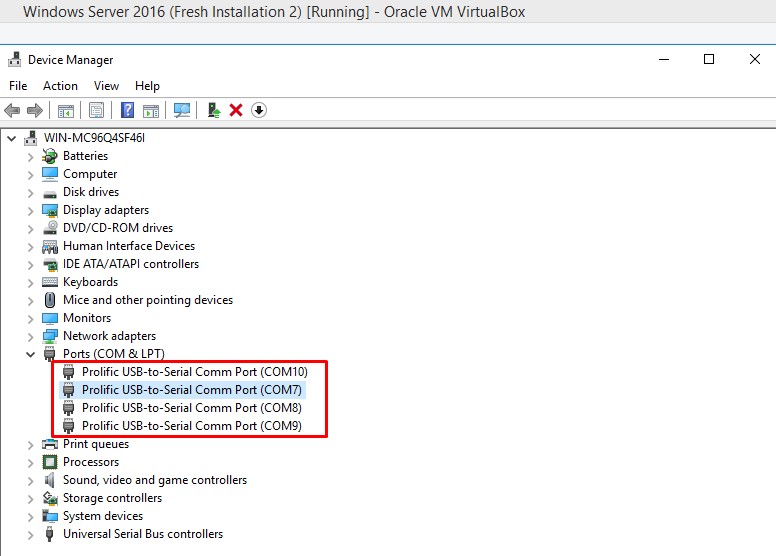
source: https://forums.virtualbox.org/viewtopic.php?f=8&t=42275
Note: If you skip step 1 and do not add a new “USB Device Filters”, instead you configure from "VirtualBox -> Devices -> USB" (Step 4), then there will be an error. “Failed to attach the USB device”.

Applies to these models :
We have conducted 4 test in 3 different OS:-
MobiGATE’s VCOM and SMS Engine Enterprise Edition works in these 3 OS:-
Many 3G modems allow you to send SMS via API or connect to 3G network but not both at the same time

MOBITEK® S80 it is a SMS modem and also a 3G modem.
MOBITEK® S80 allows you to do both at the same time — to send SMS via API and connect to your IoT server, cloud server (AWS, Azure) and web server via 3G network.
The pictures below show that MOBITEK S80 is connected to www.mobitek.my (internet) via U Mobile 3G network and at the same time, is able to send out SMS via MOBITEK SMS API.




 Reload document
  Open in new tab