
MOBITEK SMS Engine — Enterprise Edition version 6 CD
ISO File
- MOBITEK SMS Engine-EE version 5.8.1 and 6_2015-11-13.dxp
- MOBITEK SMS Engine-EE version 5.8.1 and 6_2015-11-13.iso
MOBITEK SMS Engine — Enterprise Edition version 6 CD
| 2nd | 13th of November, 2015 |
|
| Product: | MOBITEK Q24 SMS MODEM, Type SGDK | ||
| Which Development Kit are you using? |
|
What is the Operating System? | Windows 10, 64 bit |
| Description of Problem: |
Incoming msg and check credit seem fine but could not send outgoing messages. Message seems always in the queue but not sending out. SMS are stuck in the outbox, it won’t send out. But Engine can received incoming SMS into inbox.  SMS Stuck in Outbox Table  No problem in receiving incoming SMS  MOBITEK SMS ENGINE can read incoming SMS but unable to send out SMS  Outgoing SMS are stucked in the “outbox” table
 No problem in receiving incoming SMS and they are stored into “inbox” table
 Engine has disabled routing (i.e. SMS is sent to all numbers) |
||
| Suggested Solution: | We suggested you to:1. Run the SMS ENGINE as “administrator”
 Run the SMS ENGINE as “administrator” 2.Change the “Region> Formats” to “English (United States)”.  Change the “Region> Formats” to “English (United States)” – Change the format to English (US). then click OK  Change the “Region> Formats” to “English (United States)” 3. Allow “Full control” to “Everyone” for the database file, “SMSEngine5.mdb”.  Right click on “SMSEngine5.mdb” then click properties.
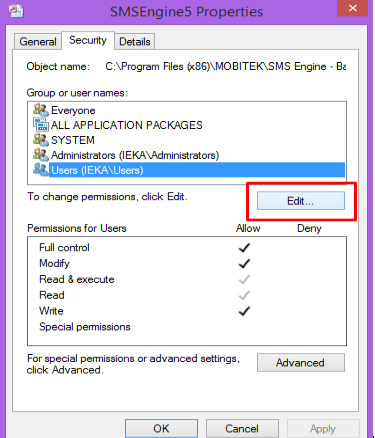 Select “Security > Users”, then click “Edit” button
 Click “Add” button
 Type “Everyone”, Click at Check Names and then click “OK”.
 Check “Full control” for “Everyone” then click “OK”
|
||

MOBITEK MobiGATE — SMS Gateway for Enterprise
MOBITEK® MobiGATE model: SG-4-E is an IP based SMS gateway.
MOBITEK® MobiGATE has an IP address, e.g. 192.168.10.220
Each GSM channel/SIM card has an IP port, e.g.

Start the Link Software and Select MOBITEK SMS 360

Use MOBITEK SMS360 from outside of HQ

Introduction & Support

Installation Guide

Driver
More Information
Applies To:-
Error Message: ERROR [IM002] [Microsoft][ODBC Driver Manager] Data source name not found and no default driver specified
Solution: Do no use MySQL ODBC Driver 64 bit; must use 32 bit that is included in the CD, “mysql-connector-odbc-5.1.5-win32.msi”.

VSP Console version 2.8 Shows “Unconnected”
Problem: after adding new “COM port” and adding new “net”, MobiGATE’s SMS Engine is not able to initialise the modem.
Solution: restart PC/server. Sometimes, the configuration in Virtual Serial Port Console will take effect after restarting.
Applies to:-

MOBITEK MobiGATE — SMS Gateway for Enterprise
MOBITEK® MobiGATE is a SMS Gateway for Enterprise.
Training conducted in MOBITEK’s office is free-of-charge.
6th FLOOR, SUITE 16, IOI BUSINESS PARK,
PERSIARAN PUCHONG JAYA SELATAN, BANDAR PUCHONG JAYA,
PUCHONG 47100, SELANGOR, MALAYSIA
room capacity: maximum 5 + 1 (trainer); above 6 will be uncomfortable

Supported OS:-
Now it comes with MOBITEK® SMS360 E-Mail Edition

Start-Up Page of MOBITEK SMS360
For more information, please refer to:-
ISO File Name: MOBITEK SMS360_2015-07-31.iso